- Call us 01444 237070

Wacom 14-inch Pen and Touch Display for Business
Product Code: U157066P
Share this item:
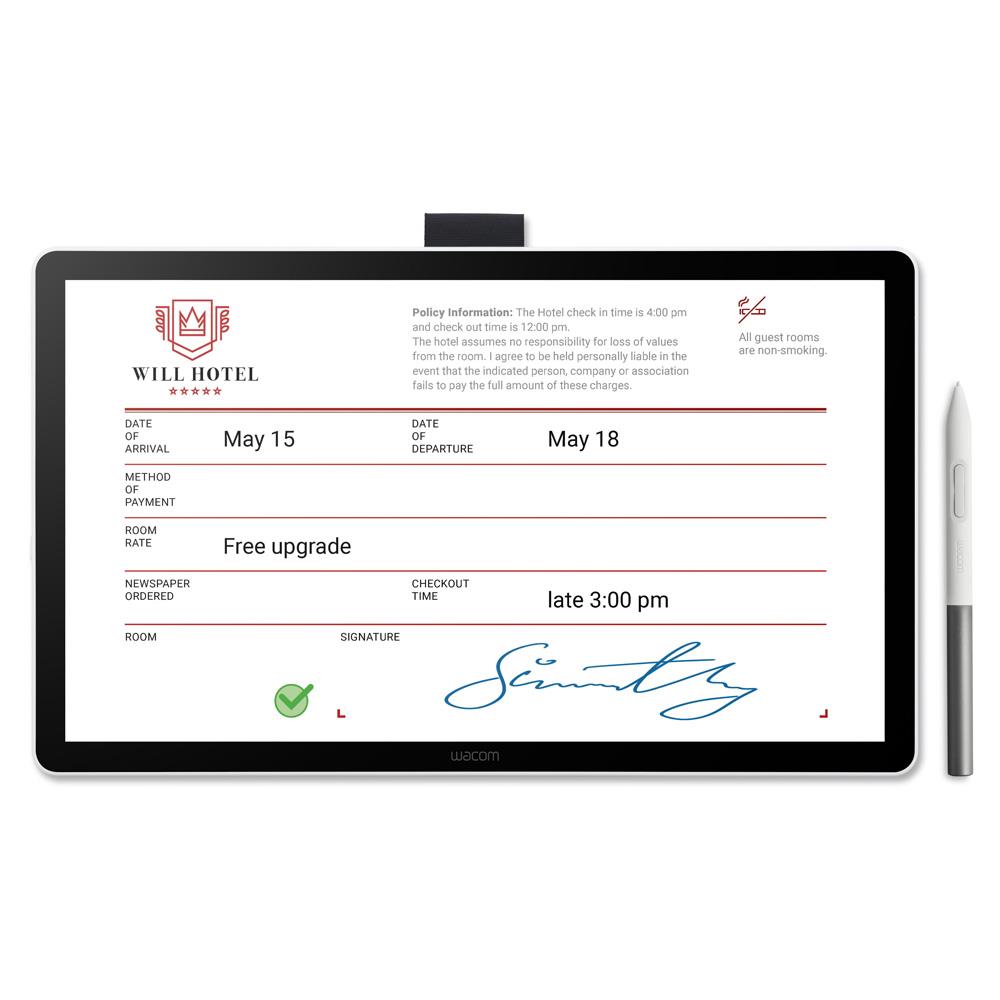
The Wacom 14-inch Pen and Touch Display for Business (DTH142E) combines battery-free EMR pen input, multi-touch and an anti-glare Full HD screen for signing, form filling, annotation and digital document workflows.

Key Features
- 14-inch Full HD IPS display
- Battery-free EMR pen technology
- 4096 pressure levels and 60° pen tilt support
- Projected capacitive 10-finger multi-touch
- Anti-glare and anti-fingerprint cover glass
- USB-C and HDMI connection options
- Windows, macOS and Linux compatibility
- No internal battery, CPU or data storage
Summary
Bring the familiarity of handwriting and touch into digital business workflows with a responsive surface that feels immediate and easy to use. The generous 14-inch screen leaves plenty of room for documents, while pen and multi-touch input make interacting with on-screen content feel natural.
There is more going on beneath the simple exterior. No battery, CPU or built-in storage means user data cannot be stored or processed by the display itself, while flexible connectivity and broad operating system support make integration easier across different working environments.
In More Detail
Write naturally with battery-free EMR technology
Electromagnetic resonance technology provides precise pen input without a battery inside the pen, so there is nothing to charge before writing. Support for 4096 pressure levels, 60° tilt and a 360 reports-per-second pen report rate helps handwriting and annotation respond naturally to the user’s input.
The supplied One Standard Pen works across a 309 x 174 mm active area, with an 8 mm reading height and 2540 lpi resolution. These capabilities give signatures, handwritten notes and document mark-ups the precision expected from a dedicated digital writing surface.
Interact directly with documents through multi-touch
Projected capacitive touch supports up to 10 fingers, allowing on-screen content to be controlled directly alongside pen input. A 120 Hz touch report rate keeps interaction responsive, while a physical slider provides a straightforward way to switch touch input on or off when it isn’t required.
Having both methods available on the same surface makes it easier to move between navigating an interface and completing handwritten tasks without changing devices.
A clear 14-inch surface for digital paperwork
The 35.6 cm IPS LCD combines a 1920 x 1080 Full HD native resolution with a sizeable active area for viewing and working with forms, documents and other business applications.
Anti-glare and anti-fingerprint glass helps control reflections and marks during frequent interaction, providing a more comfortable writing surface. The panel also offers typical 98% sRGB coverage, 270 cd/m² brightness, a 1000:1 contrast ratio and 60 Hz refresh rate.
Keep sensitive information on the host computer
A particularly useful characteristic for regulated and customer-facing environments is what the unit doesn’t contain. There is no CPU, built-in memory, storage or internal battery, so it cannot retain or process user data independently. Processing instead takes place on the connected host computer.
Physical security is supported by a Kensington NanoSaver lock slot, providing another consideration for installations where the hardware remains accessible to customers or other users.
Flexible connections for existing computer systems
Two USB-C ports and one mini-HDMI connection provide several ways to incorporate the display into a workstation. Video can be received through DisplayPort Alt Mode over USB-C or HDMI, with host connection available through USB-C or HDMI plus USB-A.
Support covers Windows 10 and later, macOS 13 and later, and Linux.
Integrate handwriting and signatures into digital workflows
Compatibility with Wacom Signature SDK and Sign Pro PDF helps businesses incorporate handwritten input into established digital processes. Form filling, electronic signatures and annotation are among the intended applications, allowing paper-based interactions to move onto a digital interface.
This focus makes the display relevant to customer-facing and document-based environments where handwriting still has an important role but the resulting information needs to remain digital.
Frequently Asked Questions
Does this model work without a computer?
No. It does not contain a CPU or built-in storage and relies on a connected host computer for processing. This also means user data cannot be stored or processed independently by the display.
Does the pen need to be charged?
No. EMR technology powers the pen without an internal battery, so it does not require charging before use.
Can I turn off the touchscreen while writing?
Yes. A dedicated touch on/off slider switch lets you disable touch input when required.
Which computers and operating systems are supported?
It is compatible with Windows 10 and later, macOS 13 and later, and Linux. Wacom Driver 6.4.14 or later is required for Windows 10/11 and macOS.
Can it be secured in a public or customer-facing location?
The unit includes a Kensington NanoSaver security lock slot, allowing a compatible physical lock to be attached.
Which software does it support?
Wacom Signature SDK and Sign Pro PDF for digital document and signature workflows.
Specifications
|
Product code |
DTH142E |
|
Display type |
IPS LCD |
|
Screen size |
14.0 inches / 35.6 cm |
|
Active area |
309 x 174 mm |
|
Native resolution |
1920 x 1080 Full HD |
|
Cover glass |
Anti-glare and anti-fingerprint |
|
Colour gamut |
98% sRGB typical |
|
Brightness |
270 cd/m² |
|
Contrast ratio |
1000:1 |
|
Refresh rate |
60 Hz |
|
Response time |
16 ms |
|
Pen |
Wacom One Standard Pen |
|
Pen technology |
Wacom EMR, battery-free |
|
Pressure levels |
4096 |
|
Pen tilt |
60° |
|
Pen resolution |
2540 lpi |
|
Pen report rate |
360 reports/second |
|
Reading height |
8 mm |
|
Touch |
Projected capacitive, 10-finger |
|
Touch report rate |
120 Hz |
|
Controls |
Touch on/off slider |
|
Connections |
2 x USB-C, 1 x mini-HDMI |
|
Video signal |
DisplayPort via USB-C or HDMI |
|
Host connection |
USB-C (DP Alt Mode) or HDMI + USB-A |
|
Security |
Kensington NanoSaver slot |
|
Dimensions |
336 x 201 x 11 mm |
|
Weight |
780 g including stand |
|
Colour |
White |
|
Operating systems |
Windows 10+, macOS 13+, Linux |
|
Required Wacom driver |
6.4.14 or later for Windows 10/11 and macOS |
|
Power supply |
AC 100-240 V, 50/60 Hz |
|
Typical power consumption |
7.5 W |
|
Compatible stand |
Wacom Cover Stand ACK658Z |
|
Pen storage |
Pen holder and tether hole |
|
Warranty |
3 years |
What's in the Box
- Wacom 14-inch Pen and Touch Display for Business
- Wacom One Standard Pen
Would you like to give any feedback about this page?
Complete our feedback formWriting your review
Sign In / Register
Existing Customer Login
If you are already a member, fill in the details below to login & view your account.
Condition guide
Our used products are subject to wear and tear in comparison to brand new products. This also applies to accessories that are supplied with the camera including batteries which may have a lower optimum performance level/life expectancy.
- Like New – The equipment is in a condition as if you have just bought it from the manufacturer. The item is still considered to be ‘Like New’ even without the original packaging and accessories. The product has been fully tested and is in perfect working order. Lenses are optically clear. There may be light dust present that will not effect the imagery.
- Excellent – The equipment should be close to being ‘Like New’ but there may be some small cosmetic blemishes that lower its grade. The product has been fully tested and is in perfect excellent order.
- Cameras – Should have no marks on the LCD screen
- Lenses – Should have no marks on the elements and optically clear. There may be light dust present that will not effect the imagery.
- Very Good – The equipment may have some slight cosmetic wear to the paintwork and cosmetic blemishes with only light signs of use and the product has been fully tested and is in great working order.
- Cameras – The LCD screen may have small signs of wear that does not affect its display
- Lenses – The mount of the lens will start to show signs of wear
- Good – The equipment is showing more obvious signs of cosmetic wear and blemishes, but the product has been fully tested and is in great working order.
- Cameras – LCD screen may have scratches or wear that is starting to affect the display.
- Lenses – May have slight dust inside that does not affect images. The mount shows signs of use.
- Well Used – The equipment will show significant signs of wear. The paintwork will be coming away in large areas exposing the metal work, but the product has been fully tested and is in great working order.
- Cameras – LCD screen is heavily worn either by de-lamination or has scratches to it. Rubber grips are starting to come away from the body.
- Lenses – The lens has dust inside that may affect images. The rubber zoom/focus ring is coming away from the barrel of the lens.
*All of our used items are listed with the accessories that are included. If they are not listed, then they will not be supplied at the point of purchase.
Why Buy Second Hand from Park Cameras

Park Approved Stock
Our used stock goes through a rigorous quality process. Each item is carefully inspected by our experienced specialists during the trade-in process and checked again before being listed for sale. This ensures you can shop with total peace of mind, knowing your gear has been thoroughly tested and approved.

Upto 12 Month Warranty
Shop our used gear with total confidence. Every item comes with upto a 12-month warranty (unless stated otherwise). Get the best brands for great value, and peace of mind all in one place. Don’t miss out — upgrade your kit today!
14 Day Returns Policy
When you purchase a Used item, you have a 14-day returns policy if the item isn’t as described. Enjoy peace of mind while getting great value on pre-owned gear!